
How to view Message Headers in Lotus Notes
Mat Newman July 18 2012 08:42:35
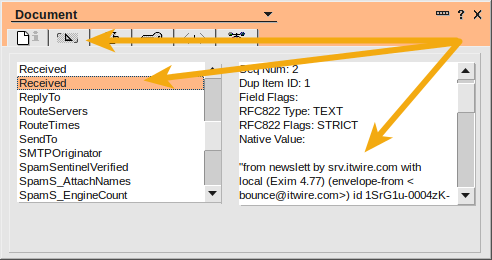
A question I get asked frequently by Admins and Help Desk staff about Lotus Notes is how to view message headers in Lotus Notes email, you know - the information that gives all the details about the routing paths, times and delivery details for a message that originated from an internet address.There are two ways to do this, the first is to browse through the document properties of a selected message. Choose the message in question, and the press [Alt]+[Enter] on your keyboard to bring up the document properties, where you can browse through the fields like RouteServers, PostedDate, etc.
Figure 1: A document properties window showing individual delivery fields
Lotus Notes Tip:
The Document Properties dialog can be used to display information about anything in Lotus Notes, not just an email message.
The Document Properties dialog can be used to display information about anything in Lotus Notes, not just an email message.
The second is even easier:
1. Open a message
2. From the View menu choose Show -> Page Source
Figure 2: The message header information
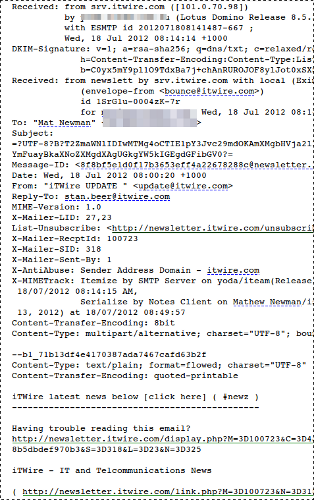
There it is, all the delivery information relating to a particular message, full screen with all the transfer and routing information included.
Viewing message headers in Lotus Notes. Easy.
Enjoy :-)
EDIT:
Mitch Cohen just pointed me to Wes Morgan's excellent series which explains message headers in more detail, get the full story HERE: http://wesmorgan.blogspot.com.au/2012/07/understanding-email-headers-part-i-what.html
Mitch Cohen just pointed me to Wes Morgan's excellent series which explains message headers in more detail, get the full story HERE: http://wesmorgan.blogspot.com.au/2012/07/understanding-email-headers-part-i-what.html

 Feeds
Feeds