
matnewman.com

How to manage groups and their members easily in Lotus Notes Admin

Mat Newman  6 August 2012 03:57:30 PM
One of those simple little Domino Administration tools that makes it so easy to manage Groups and their content from within IBM Lotus Domino Administrator.  Last week while training this was another of those gems that the participants found exceptionally useful.

How do you access the Domino Group Management tool?


From within Domino Administrator:
1.        Go to the people and groups Tab,
2.        Expand the Tools on the right hand side of the screen
3.        Expand the Groups heading
4.        Choose Manage (figure 1)

Figure 1: Accessing the Domino Administrator Manage Groups tool
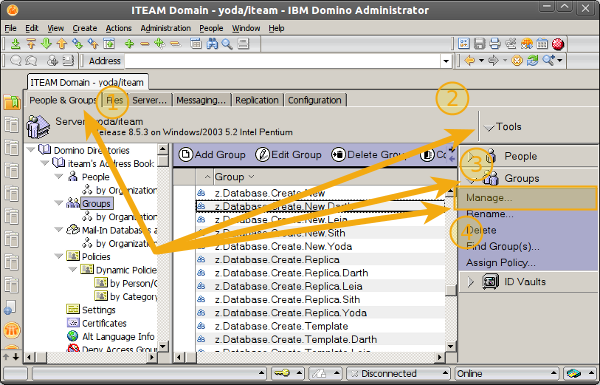
Accessing the Domino Admin Manage Groups tool

How to Examine a Users Group Membership:

1.        Choose the person from the left of the Manage Groups dialog
2.        Choose "Only Member Hierarchies" (figure 2)

This will show you all of the groups that a person is a member of, including sub-groups if the user is nested within groups in the Domino Directory

Figure 2: Showing a users group membership
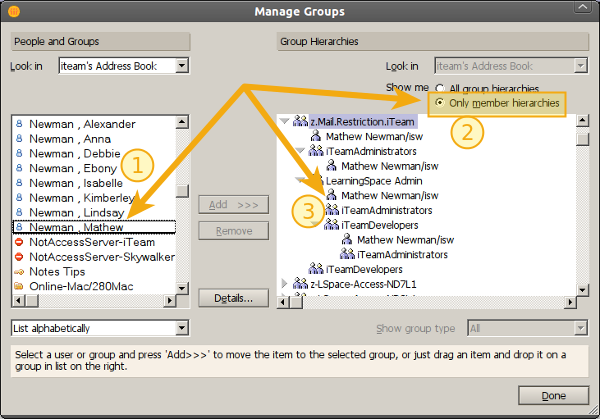
Showing a users group membership

How to add a user to a group:

1.        Select the group to add a user to from the right of the Manage Groups dialog
2.        Choose the user to Add from the left
3.        Click the "Add" button in the middle of the screen (figure 3)

Figure 3: Adding a user to a group
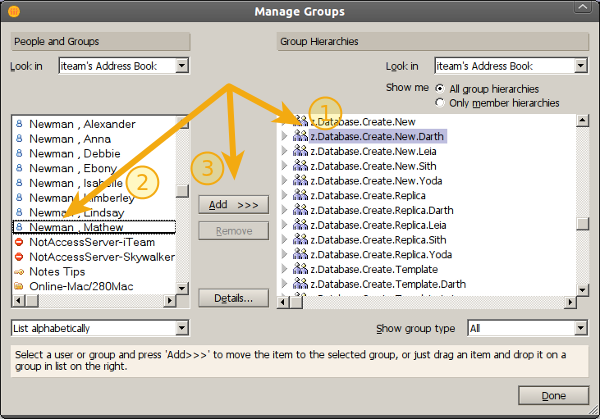
Adding a user to a group

Removing a user from a group:

1.        Select the user from within a group on the the right of the Manage Groups dialog,
2.        Click "Remove"

Figure 4: Remove a user from a group
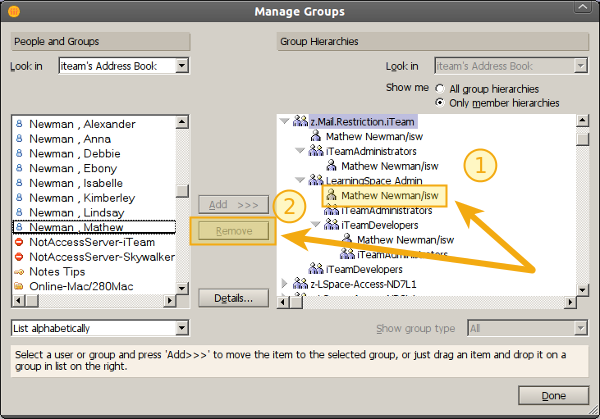
Removing a user from a group


Managing groups within your Lotus Notes Domain using the Manage Groups tool in the Domino Administrator client.  Easy.

Enjoy :-)
Comments

1Nick Halliwell  6/08/2012 8:04:35 PM  How to manage groups and their members easily in Lotus Notes Admin

Yes a great tip and one this is very oftern over looked by administrators.

2Dag Kvello  6/08/2012 8:43:12 PM  How to manage groups and their members easily in Lotus Notes Admin

But how do You "clone" one users memberships to a new one ?

If You add a new user that's going to have the same memberships as another user (let's say 30 groups) then You have to have a written document of all groups that the template user is a member of and manually add the new user to one and one of those 30 groups.

I wish I could use the same manner as in "Copy ACL" from one DB and "Paste ACL" to another and maybe do a "Copy Group Memberships" from one user and "Paste Group Memberships" to another.

3David Schaffer  6/08/2012 10:44:16 PM  Thanks for the tip

I'll have to remember that tool. I usually just open the group in the Notes client and manually add and delete members. I think we need a support group "I did it that way in R4 and never learned a new way".

4Dan Soares  7/08/2012 12:59:02 AM  How to manage groups and their members easily in Lotus Notes Admin

NICE one! How about a post on delegating administration of group membership to someone else?

Dan

5Peter Woodford  7/08/2012 2:28:53 AM  How to manage groups and their members easily in Lotus Notes Admin

Hi, the Ytria aclEZ tool has an interesting feature called the 'NAB Group Navigator' which lets you load all nested groups and associated memberships across a server. You can check the group memberships for a single user or even list of users (by using regular expression filtering). It’s also possible to export your findings. We have a blog post that goes over a lot of this functionality: { Link }

Full disclosure: I work for Ytria as a tech writer but I thought this was pertinent to the discussion.

6Mat Newman  7/08/2012 5:30:37 AM  How to manage groups and their members easily in Lotus Notes Admin

@2, Dag: Create Role based groups, eg:

z.iTeam.Role.ManagingDirector.PA

That then contains "Your User/iteam". Put that group in any other group that needs access. If a new user needs the same Rights, you don't need to clone anything, you just put them in the Role Group.

I'm a "Lazy" admin, I don't want to constantly manage Groups and ACL's, I just want to make one quick change which does everything I need. (refer to my post the other day on Resource Management, which uses the same concept: http://matnewman.com/Webs/personal/matblog.nsf/dx/resource-reservations-setting-owners-make-sure-you-use-groups )

@3, David: Yep, that was the response in training last week too, which is why I shared...

@4, Dan: No worries, look out for it

@5, Peter: Thanks for the link, I'm sure others out there would benefit from the tool.

7Dag Kvello  8/08/2012 10:38:11 PM  How to manage groups and their members easily in Lotus Notes Admin

I do use Role-based groups as much as possible, but some customers have a lot of roles and plenty of exceptions :-)

They also have special mail-in groups.

8Danilo  9/08/2012 12:05:55 AM  How to manage groups and their members easily in Lotus Notes Admin

Hi

Thank you for the good tip.

The only thing I've noticed is that it works for groups defined as "Multi-purpose" and not for groups defined as "Mail-only"

Mat Newman

THE Lotus Notes Guy. Productivity Guru. Social Evangelist. IBM Champion for IBM Collaboration Solutions, 2011/2012/2013.

#GetProductive #GetLotusNotes

Mat Newman

New to IBM Lotus Notes? START HERE


I'm attending. IBM Software.
      Lotusphere 2012. Business. Made Social. January 15 - 19. Orlando,
      FL. Drive Adoption for IBM Connections


Home  | 

Get Serious. Get Domino.